Synclet, formerly ConfigMesh, can sync Obsidian preferences and plugin settings without syncing your notes or attachments.
Before you start
- Do not use Synclet if another service already syncs the vault's
.obsidianfolder. iCloud Drive cannot exclude this folder, so keep using iCloud for the settings of an iCloud-hosted vault. - Quit Obsidian before uploading or downloading settings.
Step 1: Install Synclet
Install Synclet and sign in:
Step 2: Upload the source settings
Quit Obsidian. Create a bundle, click Choose Folder, and select the vault folder. In the Rules tab, click + Include and add:
.obsidian/app.json.obsidian/appearance.json.obsidian/hotkeys.json.obsidian/core-plugins.json.obsidian/community-plugins.json.obsidian/plugins/**/data.json
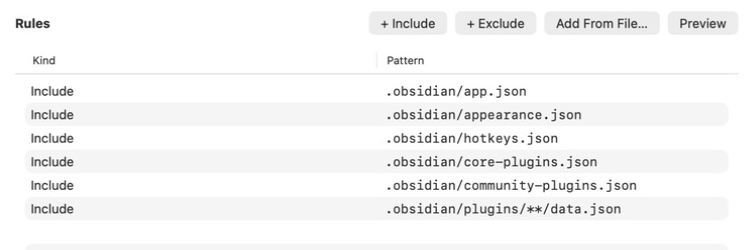
You can also add .obsidian/graph.json, .obsidian/snippets/**, and .obsidian/themes/**. Do not include plugin code or workspace.json.
Click Preview and check the matched files. The free plan supports 10 files, so narrow the plugin rule if the preview exceeds that limit. Files over 1 MiB are skipped.
If you renamed Obsidian's config folder, replace .obsidian in each rule with that folder name.
Click Upload Only.
Step 3: Download the settings on another Mac
- Back up the vault's
.obsidianfolder. - Quit Obsidian.
- Sign in to Synclet with the same account and encryption key.
- Open the remote bundle, click
Import Bundle, and select the local vault folder. - Click
Download Only. This replaces the matching local settings with the uploaded copies. - Reopen Obsidian and check the settings.
Synclet does not copy plugin code. Reinstall the plugins listed in community-plugins.json; their downloaded data.json settings take effect after installation.
What stays outside Synclet
Keep using your existing service for Markdown files and attachments. Do not add them to this bundle.
Plugin data.json files can contain API tokens. Synclet encrypts these files before uploading them.
Previous copies may still exist in Git history or cloud file versions. Rotate any tokens that were synced without encryption.