Sync Claude Code, Codex, and Cursor Across Your Machines
Synclet is an end-to-end encrypted config sync app for macOS, Linux, and Windows. Edit CLAUDE.md, AGENTS.md, custom skills, slash commands, or mcp.json on one machine and pull the same setup onto your other Macs or SSH dev servers without committing API keys to a Git repository.
$ synclet plan
  ↑ upload   ~/.claude/CLAUDE.md
  ↑ upload   ~/.claude/skills/code-review/SKILL.md
  ↓ download ~/.codex/config.toml
  ↓ download ~/.cursor/mcp.json
  · ignored ~/.claude/projects/ & worktrees/

$ synclet sync
✓ Synced 4 encrypted files across 3 bundles
What to sync inside ~/.claude, ~/.codex, and ~/.cursor
Agent home directories store kilobyte prompt files and mcp.json API keys right alongside gigabytes of chat transcripts, SQLite databases, and git worktrees. Select an agent below to inspect which paths Synclet encrypts and which stay local.
~/.claude/Directory layout on disk- ├── CLAUDE.mdglobal instructionssynced
- ├── settings.jsonpermissions & hookssynced
- ├── skills/reusable SKILL.md folderssynced
- ├── commands/custom slash commandssynced
- ├── agents/custom subagent promptssynced
- ├── projects/hundreds of MB of JSONL chat logsignored
- ├── statsig/local telemetry cacheignored
- └── worktrees/built-in Synclet excludeignored
macOS desktop app
In the macOS app, add ~/.claude with Selective rules for CLAUDE.md, settings.json, skills/**, commands/**, and agents/**.
Linux, Windows & SSH CLI
synclet config add claude ~/.claude CLAUDE.md settings.json
synclet config rule add claude "skills/**"
synclet config rule add claude "commands/**"
synclet config rule add claude "agents/**"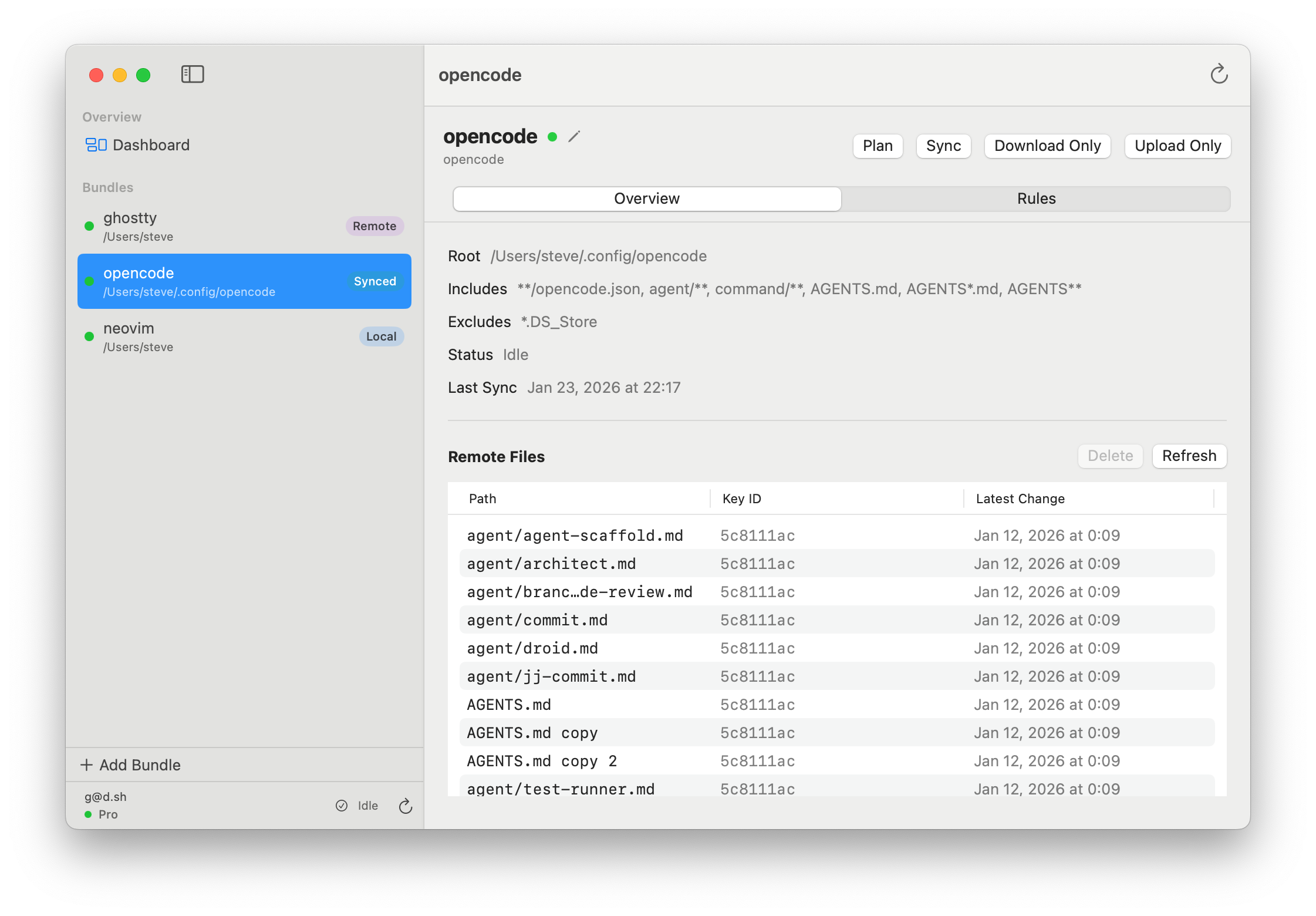
~/.agents, ~/.codex, and editor bundles.Mac desktop app at home, standalone CLI on SSH servers
Manage bundles visually in the native macOS app, then pull the same encrypted configs onto Linux workstations or remote dev containers with synclet setup.
- Automatic $HOME path mapping
- Bundles created under
/Users/you/.claudeon macOS map to/home/you/.claudeautomatically on Linux. - Encrypted MCP credentials
mcp.jsonfiles are encrypted on your machine with your passphrase before reaching Synclet Cloud or Dropbox.- Local backup before CLI overwrite
- Before overwriting a changed local file, the CLI writes a timestamped backup under
~/.config/synclet/Backups/<bundle>/.
Synclet vs. a Git dotfiles repo or plain cloud folder
| Workflow | Synclet | Git dotfiles repo | Dropbox / iCloud folder |
|---|---|---|---|
| API keys in mcp.json | Encrypted locally on device with age before upload | Plaintext in repo history unless you wire git-crypt, sops, or untrack the file | No client-side encryption; readable by the storage provider |
| Filtering session logs & worktrees | Scoped include/exclude rules; skips .claude/.codex/.cursor worktrees and files over 1 MiB by default | Clean once you write and maintain .gitignore rules per agent | Syncs the entire directory unless you symlink individual files out |
| Mac laptop to Linux SSH server | macOS app plus single CLI binary; maps /Users/<you> to /home/<you> automatically | Works anywhere git is installed; requires your own script or symlinks for path differences | iCloud has no Linux client; Dropbox needs its daemon and manual symlinks |
| Overwrite protection | Diff preview before syncing; CLI saves timestamped backups in ~/.config/synclet/Backups/ | Uncommitted local edits block git pull until you stash, commit, or merge | Background sync overwrites in place or leaves conflicted copy files |
| Revision history & code review | 2-week file version history on Synclet Cloud (Pro) and local CLI backups | Full commit log, blame, branches, and pull request review | Provider file version history (varies by plan) |
Keep a Git repo if you want commit blame and PR history on public prompts and never sync secret-bearing files like mcp.json. Use Synclet when you want prompts, skills, and API-key configs synced together across Macs and SSH boxes without maintaining encryption wrappers or symlink scripts.
Simple Pricing
Start free on Synclet Cloud, upgrade to Pro for fast unlimited cloud sync and version history, or buy an app-only license for your own Dropbox.
Free
Test Synclet Cloud on one bundle
- 1 bundle (up to 10 files)
- Synclet Cloud storage included
- 2 weeks version history
- E2EE with your personal key
- No billing required
Pro
Full Synclet Cloud storage, version history & web access
Built for speed: batches small dotfiles on Synclet Cloud, syncing far faster and more reliably than Dropbox.
- Full Synclet Cloud storage included
- Optional Dropbox sync included
- 2 weeks version history & one-click rollback
- Web dashboard to browse & decrypt files
- Unlimited bundles & files (up to 1MB/file)
- Unlimited Macs & Linux CLI machines
- E2EE with your personal key
One-time
App license for your own Dropbox
Sync against Dropbox: keep encrypted configs in your own Dropbox folder. Requires a Dropbox account.
- Sync against your own Dropbox
- Mac app & CLI for unlimited files
- E2EE with your personal key
- No Synclet Cloud storage
- Slower per-file Dropbox API sync
- No version history or web dashboard
Frequently asked questions
- Is it safe to sync mcp.json files that contain API keys?
- Yes. Synclet encrypts every file locally with age using your passphrase before upload. Neither Synclet Cloud nor Dropbox receives your passphrase or plaintext files.
- Should I run the macOS app and CLI on the same Mac?
- No. Use the native desktop app on your Macs, and use the standalone CLI on Linux, Windows, and SSH servers, because each client tracks its own local sync state.
- What happens when an agent writes huge logs inside ~/.claude?
- Scoped include rules only match the files and skill folders you selected. Synclet also excludes .claude/worktrees, .codex/worktrees, and .cursor/worktrees by default and skips individual files larger than 1 MiB.
Full setup walkthrough for Claude Code, Codex, and Cursor
Includes exact include paths, exclude rules, and Linux SSH restore commands.