Sync Encrypted Configs to Your Dropbox
Synclet is a macOS desktop app and Linux/Windows CLI that keeps dotfiles, API-key files, and Mac app settings in sync across your machines. Every file is encrypted locally on your device before upload, so your Dropbox account only ever sees ciphertext.
How Synclet + Dropbox Works
Your files stay at their real paths on disk instead of moving into ~/Dropbox behind symlinks. Synclet encrypts each file locally with age and your passphrase, sends ciphertext into an isolated /Apps/Synclet/ folder in your Dropbox, and decrypts it back in place on your other machines.
- ~/.zshrcreal file
- ~/.npmrcreal file
- ~/.config/ghostty/configreal file
- ~/Library/.../iterm2.plistreal file
- v1/dotfiles/files/.zshrcage
- v1/dotfiles/files/.npmrcage
- v1/ghostty/files/configage
- v1/iterm2/files/...plistage
- ~/.zshrcsynced
- ~/.npmrcsynced
- ~/.config/ghostty/configsynced
- /Users/you → /home/youmapped
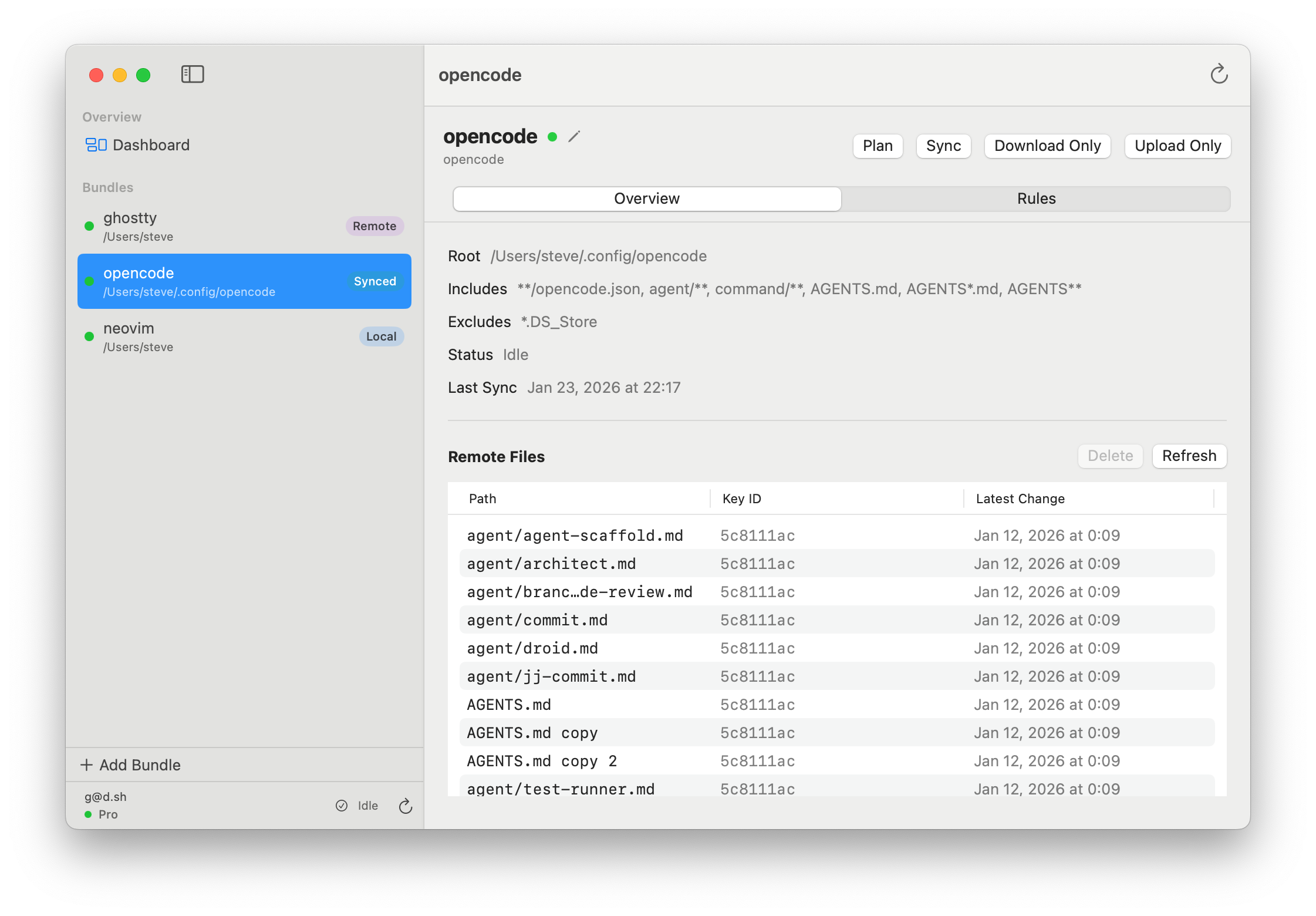
Desktop app on your Macs, direct API sync on Linux servers
Switch storage to Dropbox under Settings → Account → Cloud Storage in the macOS app. Synclet talks directly to the Dropbox HTTP API, so you do not need the Dropbox desktop client running on Linux workstations or SSH boxes:
$ npm install -g synclet
$ synclet auth login --backend dropbox
✓ Authorized Dropbox App Folder (/Apps/Synclet)

$ synclet setup
$ synclet sync
✓ Decrypted and restored 18 files from Dropbox
Synclet + Dropbox vs. symlinks and Cryptomator
Symlinking dotfiles into ~/Dropbox exposes plaintext secrets and breaks macOS preferences. Vault tools encrypt files, but require virtual drives that were not designed for live config paths.
| Capability | Synclet + Dropbox | Raw Dropbox + symlinks | Cryptomator + Dropbox |
|---|---|---|---|
| Live config paths (~/.zshrc, ~/Library/Preferences) | Real files stay at original paths; works with macOS cfprefsd without symlinks or virtual drives | Replaces files with symlinks into ~/Dropbox, which breaks macOS 14+ preference plists | Files live inside a mounted FUSE or WebDAV drive, so configs still need symlinks |
| What gets encrypted | File contents encrypted locally with age; bundle and relative file paths live under /Apps/Synclet/ | No client-side encryption | Encrypts both file contents and filenames inside the vault |
| Dropbox account access | App Folder OAuth token scoped only to /Apps/Synclet/ | Full Dropbox account synced by the desktop client | Full Dropbox account synced by the desktop client (vault folder inside it) |
| Preview & conflict handling | Diff preview of uploads, downloads, and conflicts before writing to disk | Syncs continuously in the background; creates conflicted copy files on collision | Syncs vault chunks in the background; creates conflicted files on collision |
| Headless Linux & SSH servers | Single standalone CLI binary over HTTPS; no Dropbox daemon required | Requires running the headless Dropbox daemon | Possible via cryptomator-cli, but requires both Dropbox sync and a FUSE mount |
| Version history & mobile apps | Uses Dropbox file history; desktop and CLI focused (no mobile app) | Dropbox file history and mobile app | Dropbox file history on vault files, plus iOS and Android vault apps |
Use Cryptomator when you want a general-purpose encrypted vault you can also open on iOS or Android. Use Synclet when you want live dotfiles and Mac app preferences synced in place across Macs and Linux servers.
Simple Pricing
Start free on Synclet Cloud, upgrade to Pro for fast unlimited cloud sync and version history, or buy an app-only license for your own Dropbox.
Free
Test Synclet Cloud on one bundle
- 1 bundle (up to 10 files)
- Synclet Cloud storage included
- 2 weeks version history
- E2EE with your personal key
- No billing required
Pro
Full Synclet Cloud storage, version history & web access
Built for speed: batches small dotfiles on Synclet Cloud, syncing far faster and more reliably than Dropbox.
- Full Synclet Cloud storage included
- Optional Dropbox sync included
- 2 weeks version history & one-click rollback
- Web dashboard to browse & decrypt files
- Unlimited bundles & files (up to 1MB/file)
- Unlimited Macs & Linux CLI machines
- E2EE with your personal key
One-time
App license for your own Dropbox
Sync against Dropbox: keep encrypted configs in your own Dropbox folder. Requires a Dropbox account.
- Sync against your own Dropbox
- Mac app & CLI for unlimited files
- E2EE with your personal key
- No Synclet Cloud storage
- Slower per-file Dropbox API sync
- No version history or web dashboard
Dropbox sync FAQ
- Can Dropbox or Synclet read my files?
- No. Synclet encrypts every file on your machine with age using your passphrase before anything leaves your device. Your passphrase is never sent to Synclet or Dropbox, and Dropbox only stores opaque ciphertext blobs.
- Do I need the Dropbox desktop app installed?
- No. Synclet talks directly to the Dropbox HTTP API using an OAuth token scoped strictly to Apps/Synclet/. That means it also works on Linux workstations and headless SSH servers where Dropbox desktop is not installed.
- Should I pick the One-time license or Pro for Dropbox?
- Both unlock unlimited encrypted bundles and files on your own Dropbox across the macOS app and CLI. Pick One-time ($14.99 once) if you only want Dropbox storage with no subscription; pick Pro ($1.99/mo) if you also want Synclet Cloud storage, 2-week version history, and the web dashboard.
- Can I try Synclet before paying?
- Yes. Download the macOS app or CLI and test Synclet for free on Synclet Cloud (1 bundle, up to 10 files, no credit card). When you are ready to move storage to your Dropbox, unlock One-time or Pro and switch backends in Settings.
Step-by-step Dropbox OAuth and CLI setup guide
Covers macOS Cloud Storage settings, headless CLI login, and switching existing bundles to Dropbox.