Encrypted chezmoi and yadm alternative
Compare terminal dotfile managers like chezmoi, yadm, and GNU Stow against Synclet's client-side encrypted CLI and macOS app workflow.
Terminal dotfile managers like chezmoi, yadm, and GNU Stow store your configs inside a Git repository. That works well for plain text shell files, until you need to sync .npmrc, .aws/config, .ssh/config, MCP tokens, or macOS app preferences across machines without wiring up GPG keys, age recipients, or template files.
Synclet gives you a standalone CLI for Linux, Windows, and headless machines alongside a native macOS desktop app that syncs the same encrypted bundles. Every tracked file is encrypted locally with your passphrase (age) before upload to Synclet Cloud or your own Dropbox account. Use one client per machine (the desktop app on Macs, or the CLI on Linux and Windows), since they maintain separate local sync state.
How Synclet compares to chezmoi, yadm, and GNU Stow
| Synclet | chezmoi | yadm | GNU Stow | |
|---|---|---|---|---|
| Storage model | Encrypted bundles on Synclet Cloud or Dropbox | Git repository | Bare Git repository | Symlink farm from a Git folder |
| Client-side encryption | Built-in for every file (age) |
Opt-in via age or GPG per file | Opt-in via .yadm/encrypt archive |
None |
macOS ~/Library/Preferences |
Works in place (no symlinks) | Copies files, manual target paths | Tracked in Git, manual paths outside $HOME |
Breaks on macOS Sonoma+ |
| Overwrite safety | Diff preview; automatic CLI backups in ~/.config/synclet/Backups/ |
Diff prompt before chezmoi apply |
Uncommitted local edits block yadm pull |
Refuses conflicting targets |
| History & templates | 2-week file revisions on Synclet Cloud (Pro) and local CLI backups; no templates | Full Git commit history and Go templates | Full Git commit history and template alternates | Full Git commit history; no templates |
| Interface | Native macOS app + CLI for Linux/Windows | CLI only | CLI only | CLI only |
Terminal workflow with Synclet CLI
On Linux, Windows, or headless servers, install the standalone CLI:
npm install -g syncletSign in to Synclet Cloud or your own Dropbox account:
synclet auth login
# Or store encrypted blobs in Dropbox:
synclet auth login --backend dropbox
Track dotfiles and directories
Add files or folders into named bundles without editing YAML by hand:
synclet config add shell ~ .zshrc .zprofile .gitconfig .config/starship.toml
synclet config add secrets ~ .npmrc .aws/config .ssh/config
synclet config add nvim ~/.config/nvim -e lazy-lock.json
Directory rules match recursively, files larger than 1 MiB are skipped, and common VCS, dependency, and cache entries (.git, node_modules, .DS_Store) are excluded by default. The CLI also skips symlinks instead of dereferencing them.
Preview changes, take local snapshots, and sync
Before uploading or downloading, preview the exact file plan:
synclet status
synclet plan
Take an on-demand local backup snapshot of a bundle before making risky edits:
synclet backups snapshot -b shellUpload, download, or run two-way sync:
synclet up
synclet down
synclet sync
When two machines change the same file between syncs, synclet sync applies non-conflicting files, skips the conflict, and exits non-zero. Resolve conflicts explicitly with synclet sync --prefer local or synclet sync --prefer remote.
Bootstrap a new Linux or Windows machine
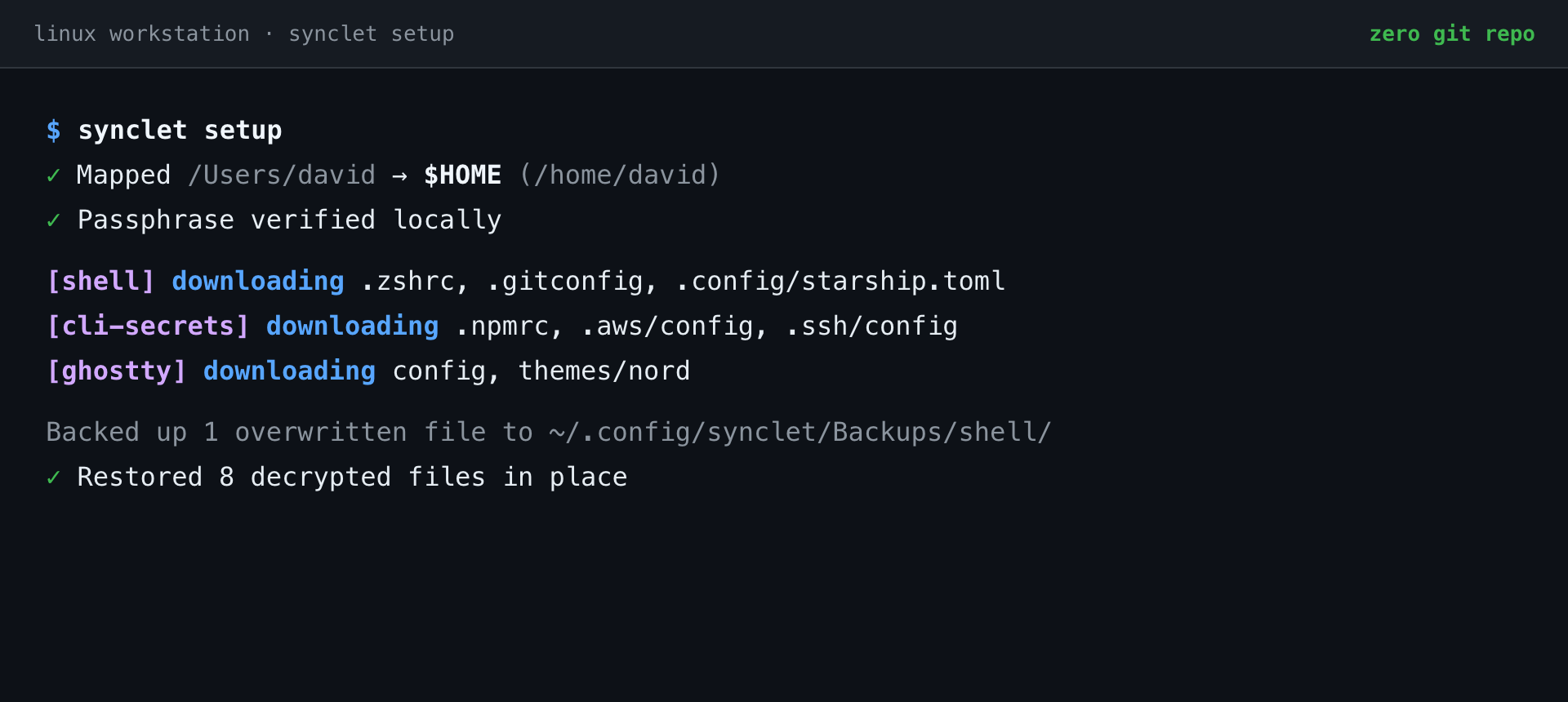
On a new Linux or Windows machine, run guided setup:
synclet setupsynclet setup signs in, pulls your remote bundle list, converts /Users/<name>, /home/<name>, and C:\Users\<name> prefixes to $HOME, verifies your passphrase locally, and restores your files. Overwritten local files are backed up under ~/.config/synclet/Backups/<bundle>/<timestamp>/. On a new Mac, open the Synclet desktop app and click Import Bundle instead.
Schedule unattended background sync
Instead of remembering git add && git commit && git push, install a background sync schedule on Linux (systemd user timer) or Windows (Task Scheduler):
synclet service install --interval 15m
synclet service status
On Macs, sync directly from the Synclet desktop app rather than running the CLI service alongside it.
When to stay on chezmoi or yadm
Stay on chezmoi or yadm if you want a public dotfiles repository, Git commit history per line change, or per-host template rendering ({{ .chezmoi.hostname }}). Switch to Synclet when you want private, end-to-end encrypted sync across your own Macs and Linux boxes without maintaining Git secret hooks or symlink trees.
For full CLI flags and config.yaml schema, see How to set up the Synclet (ex ConfigMesh) CLI. To store encrypted bundles in your own Dropbox account, see Sync encrypted dotfiles and configs to Dropbox.